Web App2026
Handscript
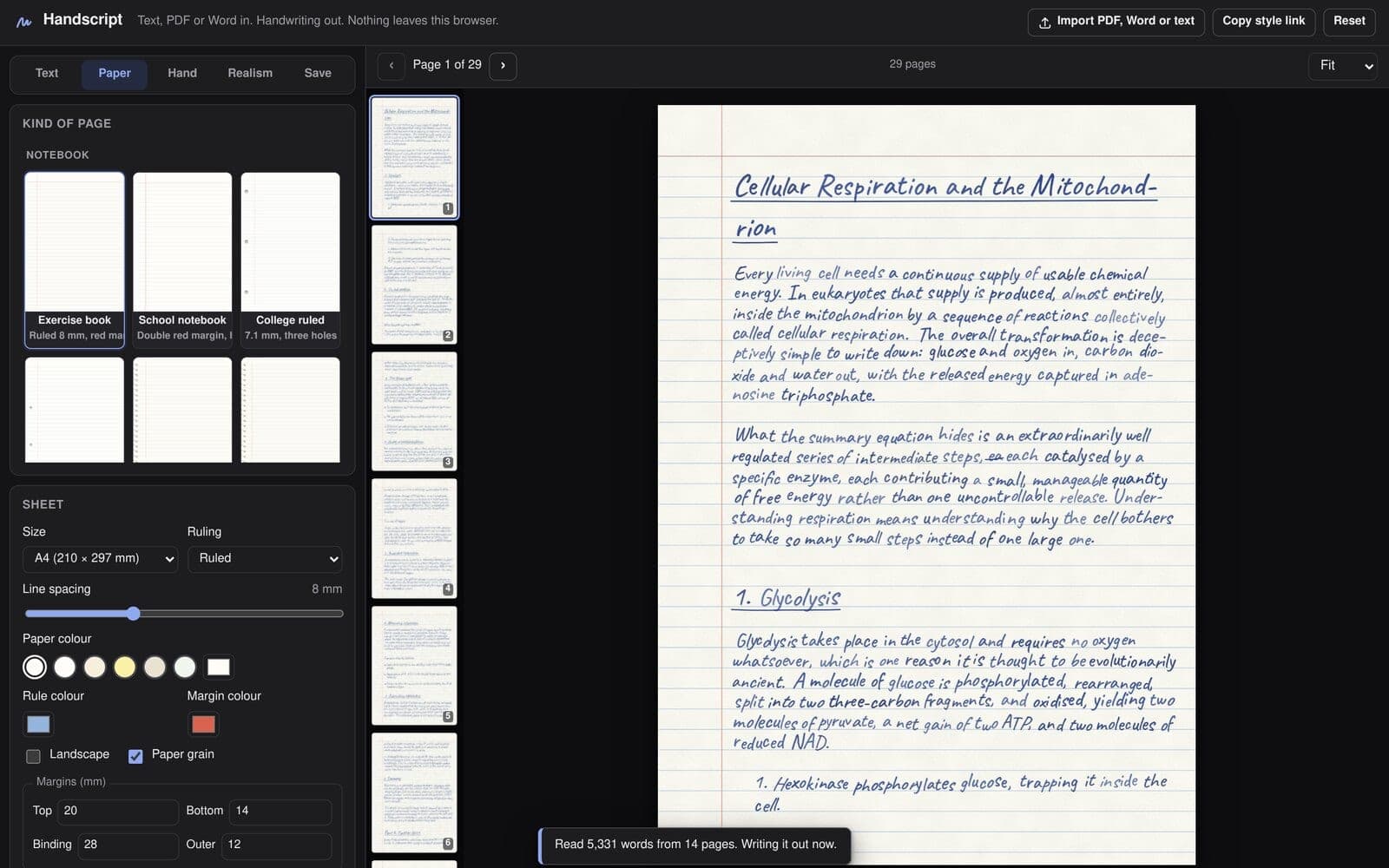
Typed text, PDFs and Word files rewritten as handwriting, each letter traced back to pen strokes and bent so no two copies match, all inside the browser.
- Type
- Personal project
- Year
- 2026
- Platform
- Web · Android
- Role
- Sole author
- Collaboration
- Solo, written with Claude Code
- Timeline
- Sep — Oct 2026
- Stack
- TypeScript · Vite · pdf.js · pdf-lib · opentype.js · Capacitor · Vitest
The problem
A handwriting font gives itself away to anyone who looks for more than a second. Every "e" is the same "e": the loop the same size, the tail ending in the same place. And the letters are filled outlines, the same weight everywhere, so a page set in one reads as felt-tip marker rather than ballpoint. Nudging and tilting each copy hides the first problem from a glance and does nothing for the second.
Handscript takes typed text, a PDF or a Word file, writes it out on one of 20 paper templates, and exports a PDF or images. All of it runs in the browser: the build is a static site with no server and no API keys, so a document never leaves the device it was opened on. It ships as that website and as an Android app.
Write the letters, don't fill them
The fix for the marker look was to stop drawing fonts as fonts. Each letter is rendered once, large, then thresholded and thinned to a one-pixel centre line with Zhang–Suen thinning. What is left is the path the pen took, and that path can be drawn with any of seven pen models: tapering where it touches down and lifts off, wider where it slowed into a turn.
Thinning recovers the lines but not which way the pen moved, and direction matters, because a down-stroke is pressed harder than an up-stroke. So each traced stroke is turned round the way a hand writes it: uprights downwards, cross-strokes from the left, loops anticlockwise from the top, dots last.
Then the repetition. Before a letter is drawn it is bent in two layers: a habitual form, seeded by the letter and one of a few variants so it repeats as a habit does, and a smaller bend that differs for every copy. The bend changes the ascender's height, the bowl's width and where a loop closes, not only where the letter sits.
None of this needed a second tracer. The vectoriser that turns a diagram in a PDF into pen lines is the same code that turns a font's letters back into strokes.
A PDF has no paragraphs
pdf.js hands back positioned runs of glyphs and nothing else, so the importer rebuilds what the typesetter threw away. Columns are found first, by looking for a vertical band no run crosses, because two columns share their baselines and grouping by height alone weaves them into one line. Running headers are lines near the top or bottom edge that recur on at least half the pages. Headings come back from the size of the type.
The first importer read equations as prose and mangled them: a displayed
formula is a two-dimensional arrangement of runs, and read line by line it
becomes three lines of nonsense. An equation is a drawing of mathematics, not
a sentence, so it stopped being read as one. Equations are found by the
fonts they are set in (CMMI, CMSY and CMEX are TeX's maths fonts), cut
out of the rendered page like a figure, and copied out: letters and digits in
the hand, fraction bars, roots and brackets traced and drawn with the pen.
Figures go the same way. A page that draws anything is rasterised, its text masked out, and the connected blocks of ink that remain become figures with their labels and captions. A histogram decides what was drawn: line art piles its greys onto a handful of values, a photograph spreads them across all of them. Line art is traced; photographs go on as prints. Each of these stages is a pure function over plain data, with its own test file.
Randomness that holds still
Realism needs noise, and noise is a problem for an editor. If the page re-rolled every time you typed, the preview would never match the download and there would be nothing stable to proofread.
So nothing in the engine calls Math.random. Every choice goes through a
seeded generator, and each word draws from a seed built from the document's
seed, its paragraph and its position in that paragraph. A page is laid out once
and rendered at whatever scale is asked for, the screen for the preview or 150
to 400 DPI for export. The same settings and seed always give the same page,
and "Write it again" is only a new seed.
A test pins the property I cared about: edit the second paragraph and the first paragraph's glyphs are identical. The guarantee is not total. The slow drift in size and slant over many lines is keyed to the line number, so a paragraph that grows by a line shifts that drift for everything below it.
One editor, two shells
The Android app does not keep a copy of the editor. It is a Capacitor shell
around the website's own source, built with one module swapped, #platform,
which holds the only code that differs: where a finished file goes and what the
back button does. Every fix to the editor lands in both, because there is
only one editor.
Most of that module is the WebView's limits. A WebView cannot download a file
the way a browser does, so the app writes it to the phone's
Documents/Handscript folder and opens the share sheet on it. A long PDF runs
to tens of megabytes, too much to hand to the native side in one call, so it
crosses in base64 pieces of about 1.5 MB. On Android 10 and older, where
writing to Documents needs a permission the user can refuse, the file falls
back to the app's cache.
The Pages workflow runs the tests, builds the site, builds the APK and publishes it beside the site, so the download button always serves the app built from the same commit.
What it does not do yet
- No OCR. A scanned PDF holds page images and no text. The importer says so and stops rather than guessing.
- Shaped scripts are not written stroke by stroke. Arabic, Hebrew, the Indic scripts and Thai are drawn a word at a time so the browser can shape them, which means no per-letter bending.
- Layout runs on the main thread. Moving it into a Web Worker is still to do, so a very long document can block typing.
- The variation is geometric. Letters are bent, not generated from a model of how a hand moves. Sigma-Lognormal strokes are on the roadmap, not in the code.
- The APK is a debug build, installed by hand. There is no signed release and no Play Store listing.